SlashPrime — the office, the fleet and every ship
//SlashPrime
Surface
Type

Kept on this browser. The accent lives in the Personal section below — the same idea as every user's own settings in the product.

Request a demo

// SlashBack · Company operations & ship management · Enterprise

The office, the fleet and every ship. One secure system.

Company operations and ship management on a single database — from the board's dashboard to the form a Third Officer signs at sea tonight. A screen for every person, compliance that schedules itself, a ship that works offline and syncs by itself, and security built on Apple's Claris platform.

⌘K find anything A dashboard per person Every SMS form interactive The ship works offline Rules you edit, not release
13Departments covered
178Modules, one interface
100%Of your SMS forms, interactive
1Database
OFFICETHE SHIP · HER OWN COPYSYNCS BY HERSELF · OUTBOUND ONLY
Nobody carries a USB stick up the gangway.
Fleet board Sample --:--:-- UTC
Own fleet · active
Vessel · position State ROB VLSFO Next due
AEGEAN STARSuez → Piraeus At sea 486,20 t SIRE 14/09/2026
IONIAN SPIRITConstanta, berth 42 In port 1.204,50 t DD 03/09/2026
ADRIATIC DAWN34°12'N 025°48'E At sea 742,80 t Class 22/11/2026
CORAL BAYAlexandria, anchorage In port 318,40 t PSC deficiency open
AMBER SEAGibraltar → Rotterdam At sea 963,10 t ISM audit 08/10/2026
NORTHERN LIGHTTuzla yard, dock 3 Off hire 112,00 t Redelivery 29/08/2026
PACIFIC ROSEColombo → Jebel Ali At sea 1.571,60 t Crew change 11/09/2026
Noon report received · AEGEAN STAR · 11:42

Figures in Greek format, dates DD/MM/YYYY — as the bridge writes them.

Passage plan01Why02Live demo03Screens04Yours05One file06The ship07Sync08The SMS09Rules10One entry11Why us12Modules13One day14How it fits15Secure16Switching17Next
178modules, one build, one interface
13departments, one menu
7tabs on every record
1source of truth, office and ship
// If you read one thing

Why this is different — the whole site in ten lines.

This page is long because the platform is. If you have five minutes, these ten points are the argument; each links to the part that proves it. If you have forty-five, the bottom of the page tells you how to see it running on your own ships.

It runs the company, not just the ships

Tasks, approvals, meetings, leave, HR, the general ledger — the work of the office lives here, with full ship-management depth underneath. Nothing lives in a mailbox. see ↓

One database. One interface. No integrations to buy

178 modules read and write the same records. A certificate, a seafarer, a purchase order is one record everywhere it appears — there is nothing to reconcile. see ↓

Every user gets their own screen

A dashboard per department and per person, light or dark, seven accents, four type sizes, a header they curate. The system fits the person. see ↓

The ship runs the same system, offline, and signs by PIN

Each vessel carries her own copy, opens on what she owes today by rank, syncs by herself, and every form is signed by a named crew member. see ↓

Every SMS form interactive, all in one register

Your Word and Excel forms become interactive forms; filled on screen or done in a module, they file one receipt into one ledger. Cadence and role make the schedule fill itself. see ↓

Risk assessed before the work, with the gaps listed

The library, the assessments carried out and the jobs, permits and drills that still need one — attached to the permit before it is issued. see ↓

Smart where it helps, and it shows its working

Documents read into records, questions answered from your own rows and manual, tasks proposed by rule. A person confirms; nothing writes on its own. see ↓

Secure on Apple's Claris platform

TLS in transit, AES-256 at rest, scheduled backups, a named account for everyone, an audit log on every commit, every ship holding only her own slice. see ↓

The regulators' registers and the fixture, on the same records

CII, ETS, FuelEU, the cyber register, rest hours, TMSA, the oil majors' crew matrices — and the chartering desk's TCE and laytime. see ↓

Yours, at your pace — and nothing retyped

From a legacy ERP or from Excel, we load your history, validate it and hand it back working. Your server or ours, unlimited users, module by module. see ↓

// Live demo

Software people open because they want to. Try it.

Fleet software has a reputation: grey, modal, three clicks from anything. This is the other kind — keyboard first, nothing reloads, and what you need next is already on the screen you are on. The one below is not a picture. Click a defect, open its dock, search, change the ships in scope.

// Live demo · five modules, one frame

//SlashPrime Aug 2026 Demo
--
Notifications
Also pushed to the phone — deep-linked to the record.
SlashPrime · now
PO 4471-A approved. Spares landing Piraeus with the crew change.

Try:

Sample data, real behaviour — the scope chip, the facets, the palette and the dock all work. Drawn in the browser, and it repaints with the accents below. The real screens are further down the page. On a phone, swipe the frame sideways.

// The real thing

What people actually see.

The demo above is drawn. These are the screens themselves, captured from the platform on a demo fleet — one modern interface on Mac, Windows, iPad, iPhone and the web, the same board, filters, search and export on each.

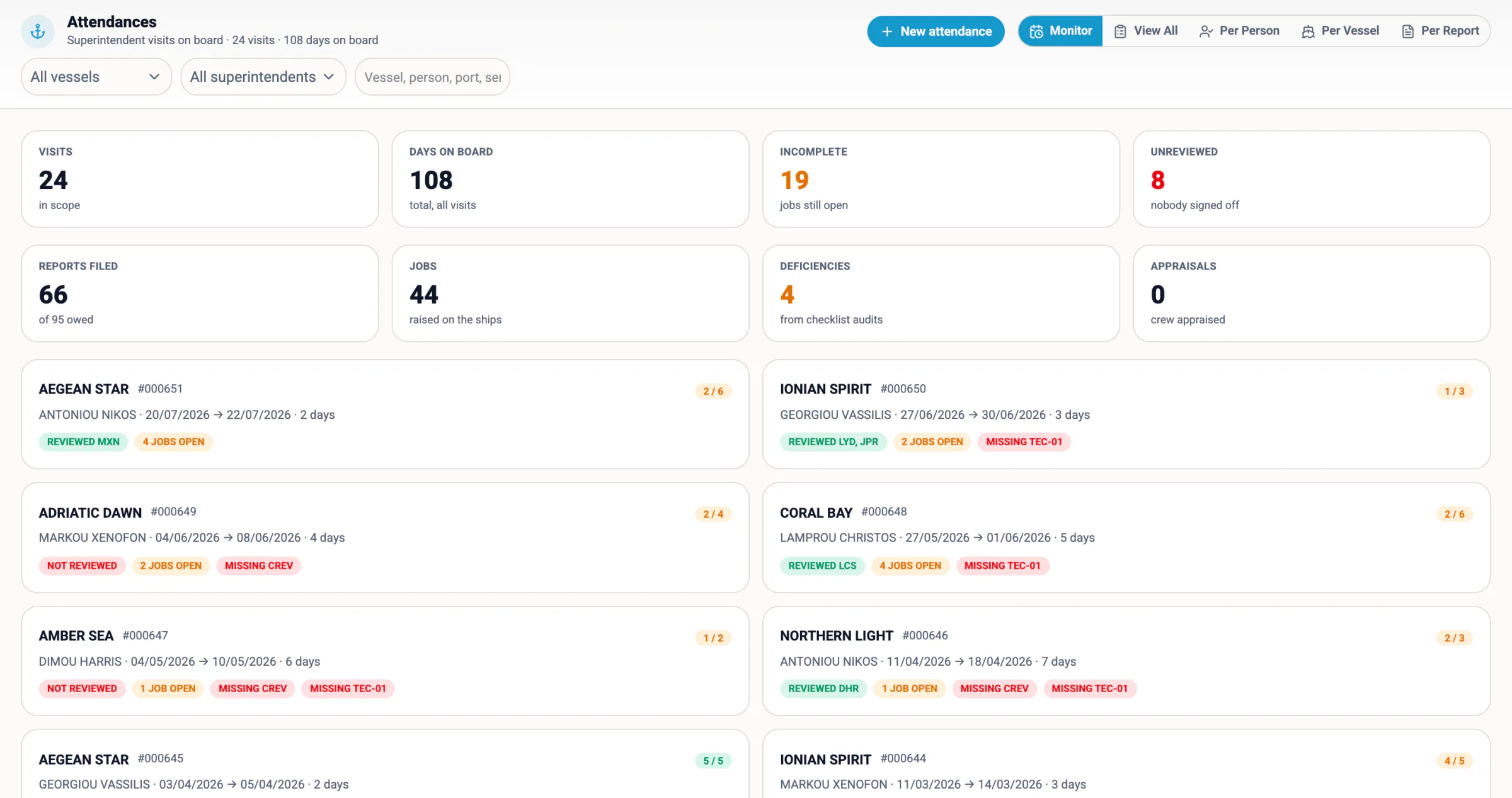
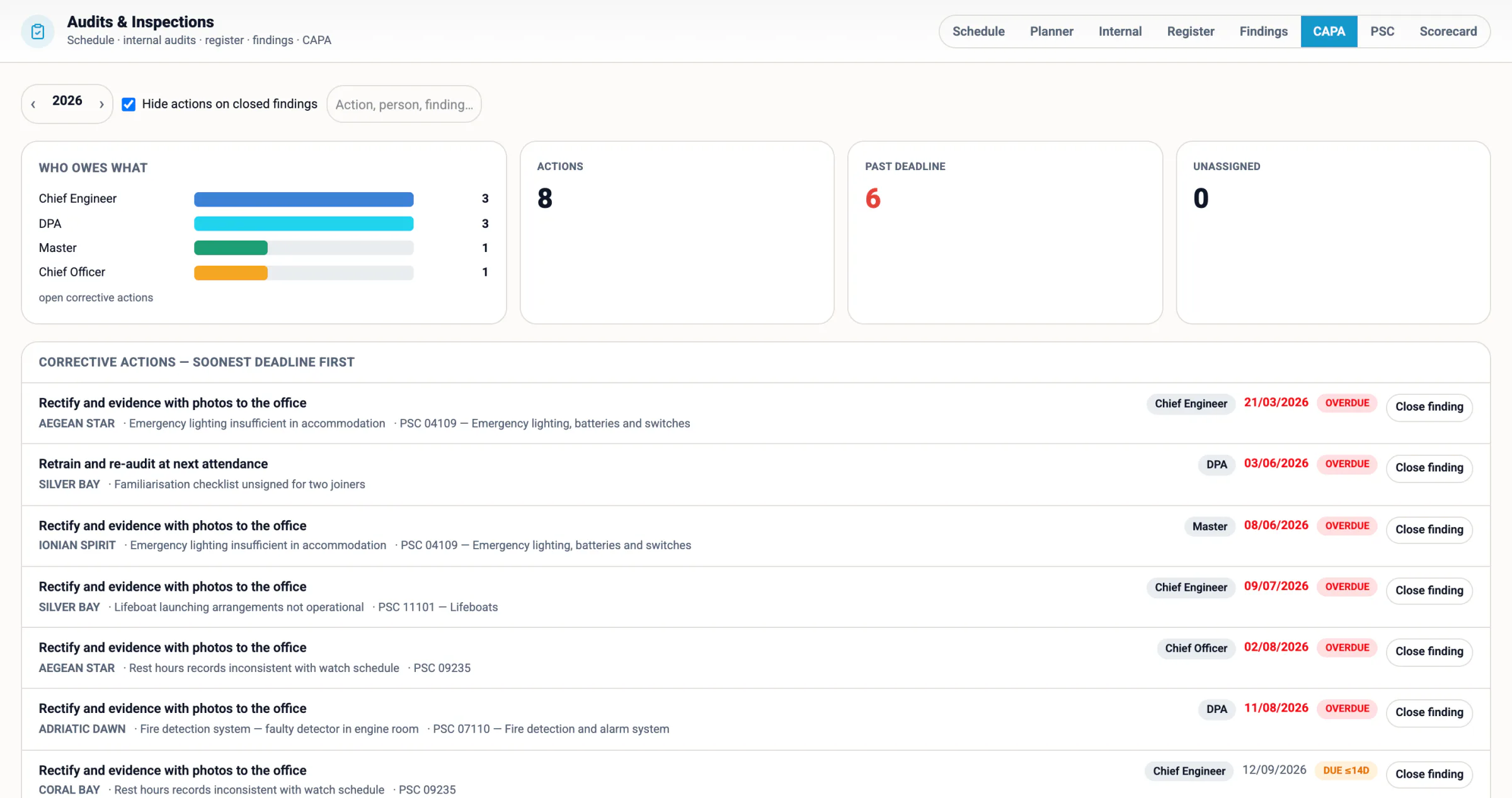
The HSQE department's board — safety events, open findings, inspections, circulars awaiting signatures, the obligations register, management of change and risk assessments, each number a door into its module.
Fleet Status — one card per ship: where she is, what she owes, what is broken and who commands, attention first.
// Personal

Every user is different. So is their screen.

A crewing manager, a technical superintendent and a managing director do not want the same first screen, the same colours or the same type size. Here the dashboard is built per department and per person, and the look of the whole platform is each user's own setting: light, dark or system; seven accents; four type sizes. Change the accent here and watch this page move.

// One board per department

Management, Operations, Technical, HSQE, Crew, Procurement, Compliance

Each opens on its own board, chosen by the viewer's department at login, composed from one catalogue of cards and headline numbers with a builder.

// My board, My Day

Yours to arrange

Every person arranges their own board and opens My Day on what needs them: approvals waiting, tasks due, meetings, announcements, notes. What they may see stays the permission.

// Look and type

Light, dark, seven accents, S to XL

Harbour, Starboard, Coral, Beacon, Sunset, Seafoam or Lavender; a typeface and four sizes; a header each user curates — on every module at once.

The Technical board — the fleet map, defects, PMS health, surveys due and conditions of class on one grid; a different department opens on a different board.
Obligations — one register across every module: what is overdue, due soon or planned, on which ship, with the module that owns it.
Accent
Surface
The whole page repaints — and so does the demo above. In the product this is each user's own setting.
//SlashPrimeShip management
//SlashCrewManning agencies
//SlashTugTug operations
// Platform

One system, because three systems never agree.

Most fleets run crewing in one place, maintenance in another and purchasing in a third, then spend the week reconciling them. SlashPrime keeps one record per ship, per person, per order — and every module reads it.

// One record

Notes, files, tasks, chat — on everything

Open any record and the same panel is there: its notes, its documents, its tasks, its checks, its conversation and its history. Not a per-module drawer that only some screens have.

// One chain

Approvals resolved by rule, not by memory

Purchase orders, leave, cash to master and requisitions all feed one approvals engine. Who signs is resolved from the rules table by fleet, department, rank and amount — and the chain is visible before it starts.

// One scope

Pick three ships once

The vessels you are working on today follow you across modules. Choose them in Bunkering and Garbage already knows. Every picker badges each ship with the count that matters on the screen you are on.

// The vessel
BRIDGE PC · KIOSK MODESIGNED BY A NAMED PERSON · PIN

The ship runs the same system — and it knows what it owes today.

Most "vessel modules" are a form the office asks the ship to fill in. This is the ship's own screen: it opens on what is due today for the rank at the keyboard, what is late, what is coming in the next fortnight, and what the office is waiting for. Every tile on it is the same module the office uses, scoped to this ship.

01 Today, by rank

Every periodic SMS form carries its cadence and its responsible role. After a PIN sign-in the ship sees only the forms still owed for that rank.

02 A PIN per person

One account per ship, a four-digit PIN per crew member. Every form, drill sheet and acknowledgement is signed by a named person, with rank and time snapshotted at signing.

03 Ship ↔ office lane

Circulars the office waits for the ship to acknowledge; requisitions and reports the ship waits on the office for; a chat thread with the office on the same screen.

04 Kiosk mode, anonymous reporting

The bridge PC boots to a lock screen with the crew list and a keypad. A near miss can be raised from it without signing in — open reporting the paper form never delivered.
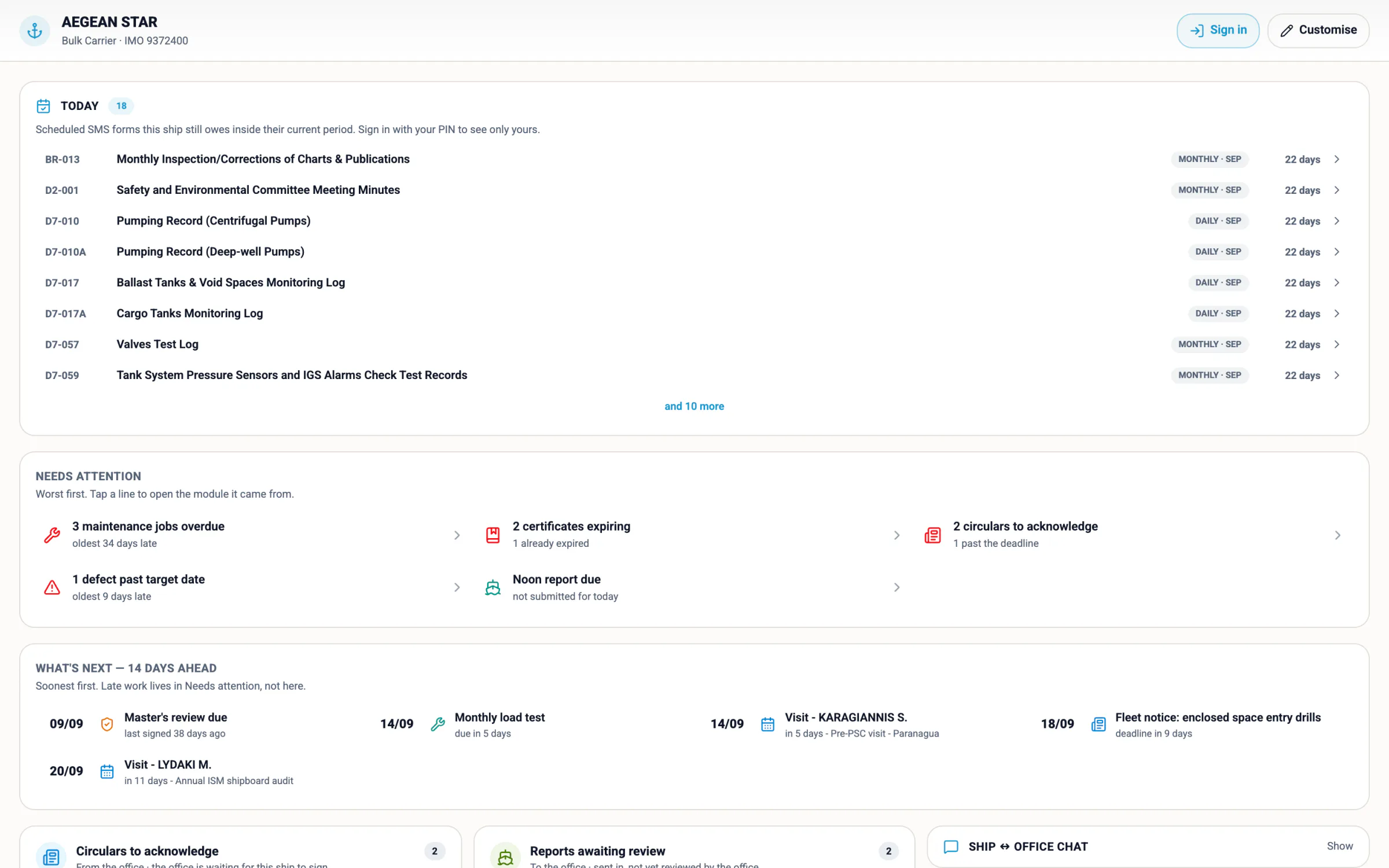
The ship's home screen — Today's forms for this ship, Needs attention, the fortnight ahead and the ship ↔ office lane.
// Office ↔ vessel

Every ship carries its own copy, and it syncs itself.

Satellite links drop and VSAT is metered, so every ship runs her own copy of the system, holding only her own slice of the data, and keeps herself in step with the office by herself. Nobody on board exports anything; nobody ashore imports anything. No third-party sync licence.

01 Only the ship's own slice

A vessel's copy holds her crew, her jobs, her forms. If a laptop walks off the gangway, it carries one ship's records, not a company's.

02 Outbound only, paired identity

The ship talks to the office server; nothing connects into the ship. Each ship file is paired to one vessel with its own account — a login on the wrong PC cannot cross-write another vessel.

03 Nothing waits for the link

Work on board is saved on board. When the link is there the changes travel; when it is not, nobody notices until it is back. A conflict is kept for a person to see, never lost.

04 One board for thirty ships

Every vessel's last contact, what is waiting and how much has travelled this month, on one office screen, with the problems that need a person on top. Updates reach the ships the same way.

Fleet Mirror — the office's view of the sync: paired ships, the last tick, the queue, traffic this month and the problems that need a person.
// The SMS

The safety management system stops being a folder.

On most ships the SMS is a shelf of manuals, a tray of printed forms and a spreadsheet that says which ones came back. Here every controlled form of your SMS — imported from your Word and Excel originals — is an interactive form on screen, filled and signed where the work happens. Filled as a form or done inside a module, it files one receipt into one ledger, and the register knows.

01 Manual section the SMS text, drafted and versioned 02 Controlled form every one of yours, each with its cadence 03 Answered in the module that owns the work, or the runner 04 Evidence who filed what, when, and for which ship 05 Compliance expected against filed, per ship, per period Amendment → each seafarer acknowledges → the manual moves on
100%of your forms, interactive
1ledger, form or module
2scores per risk assessment
0forms printed and re-typed
// register

The register

Every controlled form, faceted by chapter, category, department, event, rank and ship — with Open in the module, or Form, on each card

// schedule

Schedule

The same register by when it falls due: daily, weekly, monthly, quarterly, annual, ad-hoc

// compliance

Compliance

Expected occurrences against what the ledger holds — one cell per ship, per period

// coverage

Coverage

Which forms have a module, a definition, or still only paper — the map is a setting per client, not a build

// manual

The manual

The section tree read in place, with the company's own name filled into the text

// reviews

Master reviews

One section a month, fleet-wide. Masters comment, the office replies, nothing is verbal

// builder

Form builder

Your Word and Excel forms imported into interactive definitions — your codes, your wording, your flags

// doc-control

Doc control

Draft, diff, publish. An amendment bumps the revision and asks for acknowledgement; an editorial change does not

// permits

Permits & RA

The permit to work, and the assessment it stands on — attached to the job, the event or the entry
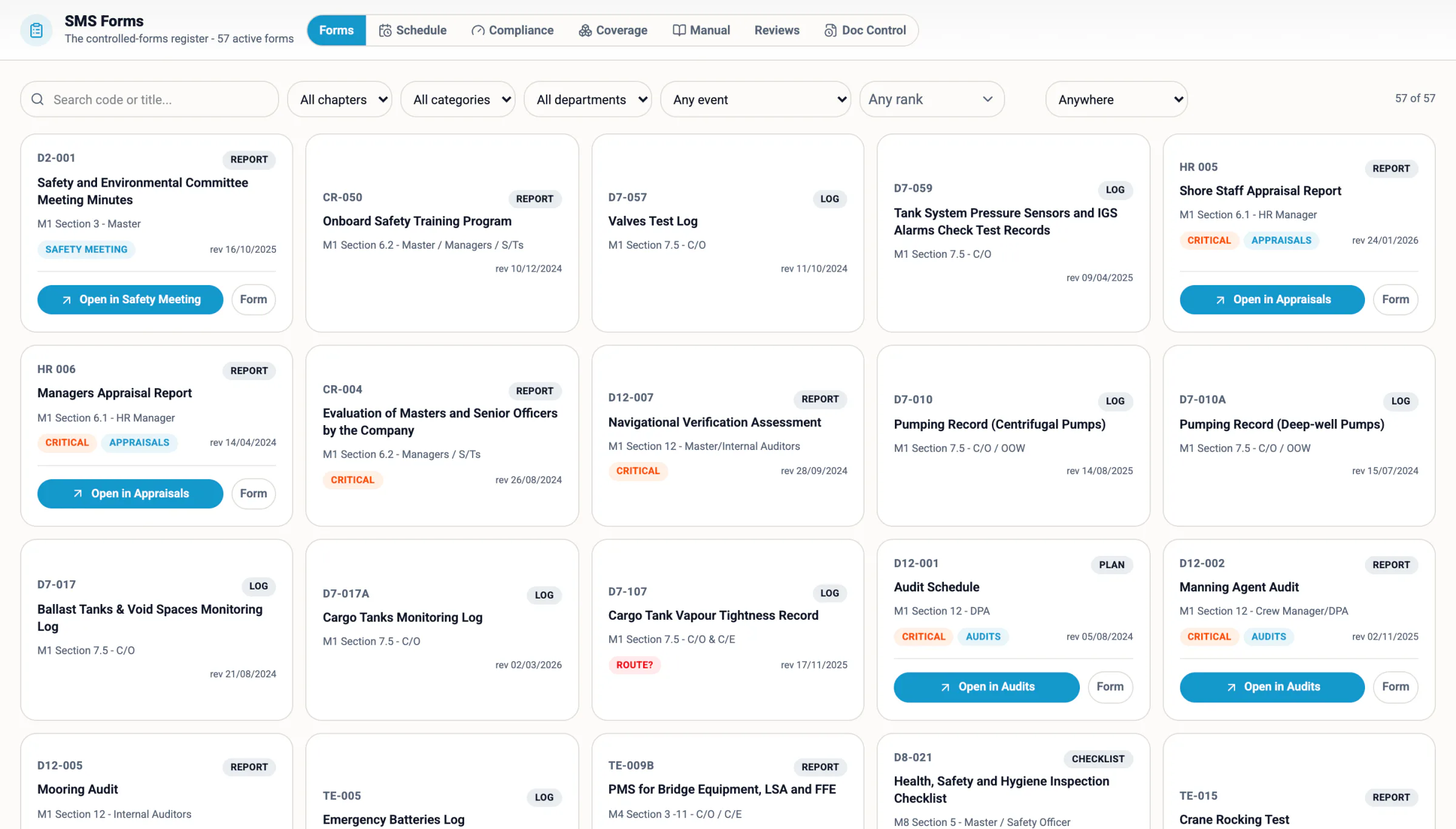
SMS Forms — the controlled-forms register: code, title, section and owner, revision date, the flags, and on each card either Open in the module or Form.
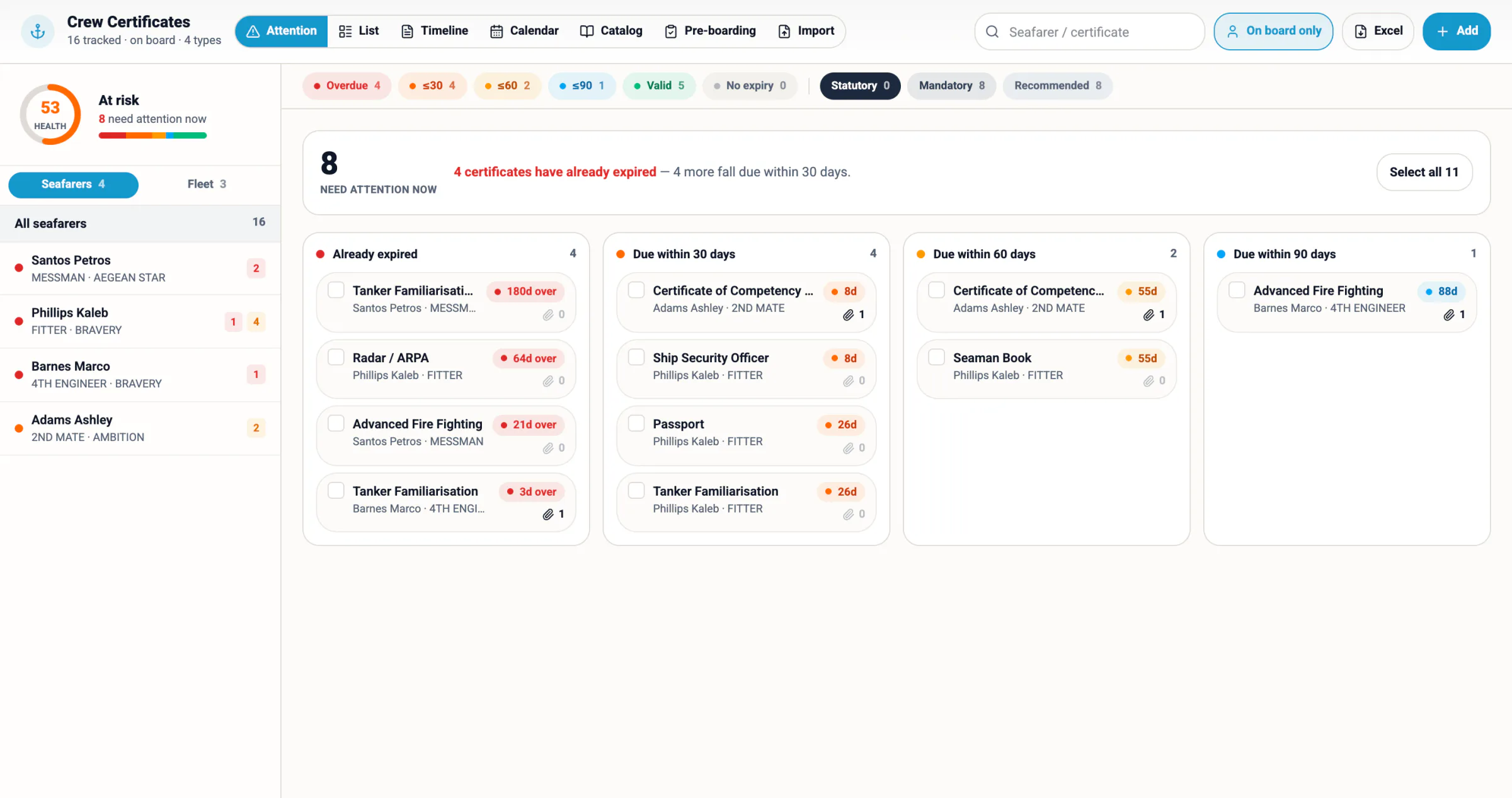
Crew Certificates — expired, due within 30, 60 and 90 days per seafarer on board, with the health score and the pre-boarding check.

Risk assessed before the work, not filed after it. Ask for the job, not the form number.

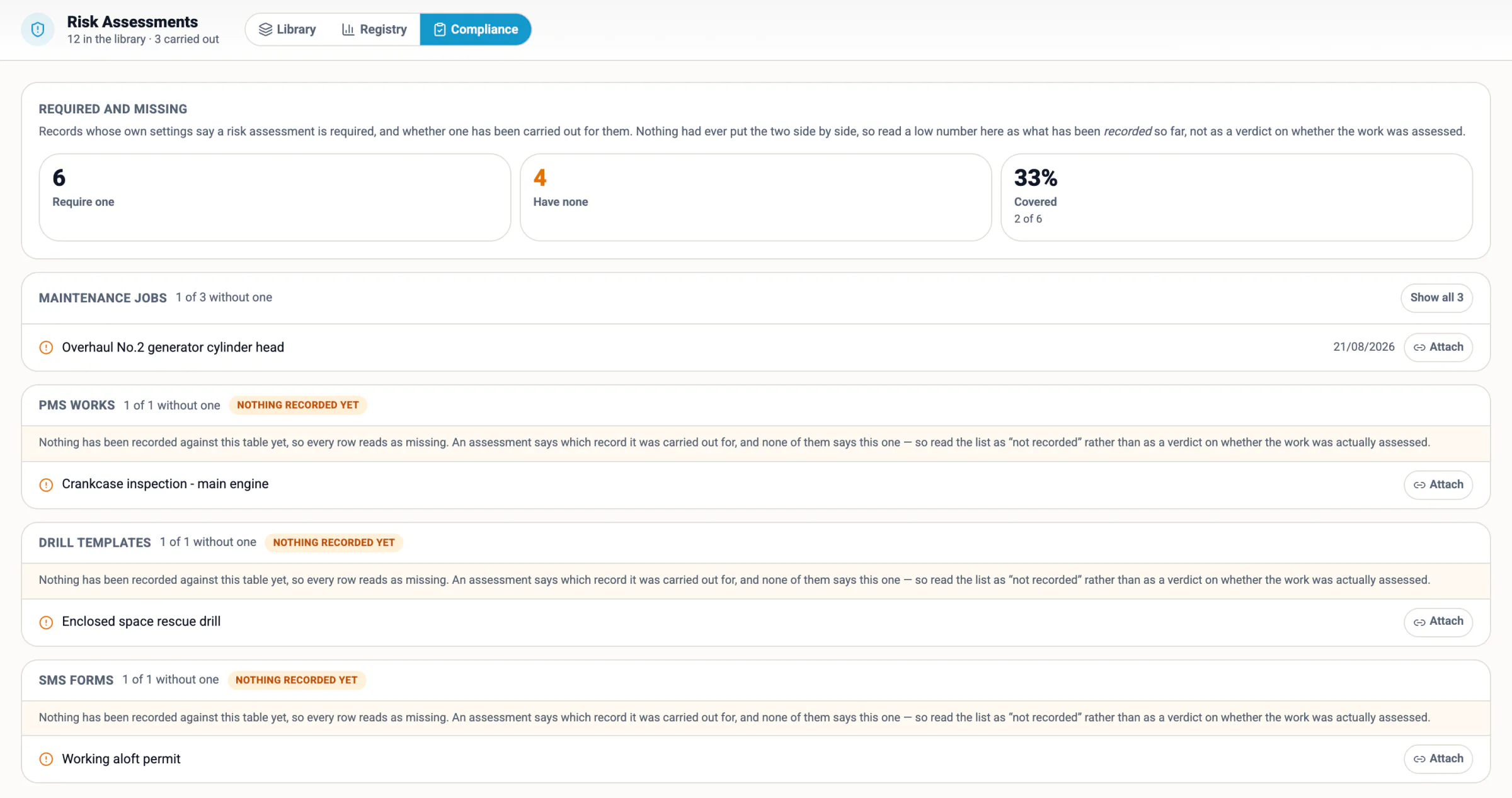
Every inspector now asks the same question: show me the risk assessment for this job — and show me the jobs that should have had one. Here the library by department, the assessments carried out and the jobs, permits and drills that still need one are three tabs of one module. Nobody on deck thinks in form codes; pick the job and the picker hands over the permit, the risk assessment and the checklist that belong to it, attached to the work order.

Risk assessment · live

Working aloft — fall from height

RA library · two scores: as found, and after the controls

Untick a control and watch the residual move. Controls mostly reduce LIKELIHOOD; only a few touch severity, because preparing for a fall or an oxygen-deficient space does not make the consequence smaller. That is why severity has a floor and never reaches 1. Until the controls are done, the first number is the one that counts — and the screen says so.
3 Acceptable · residual
● Residual, with the controls ticked ○ Inherent, with none
Likelihood → ↑ Severity
Risk Assessments — Compliance: records whose own settings require an assessment, how many have none, the coverage, and each missing one with an Attach button.
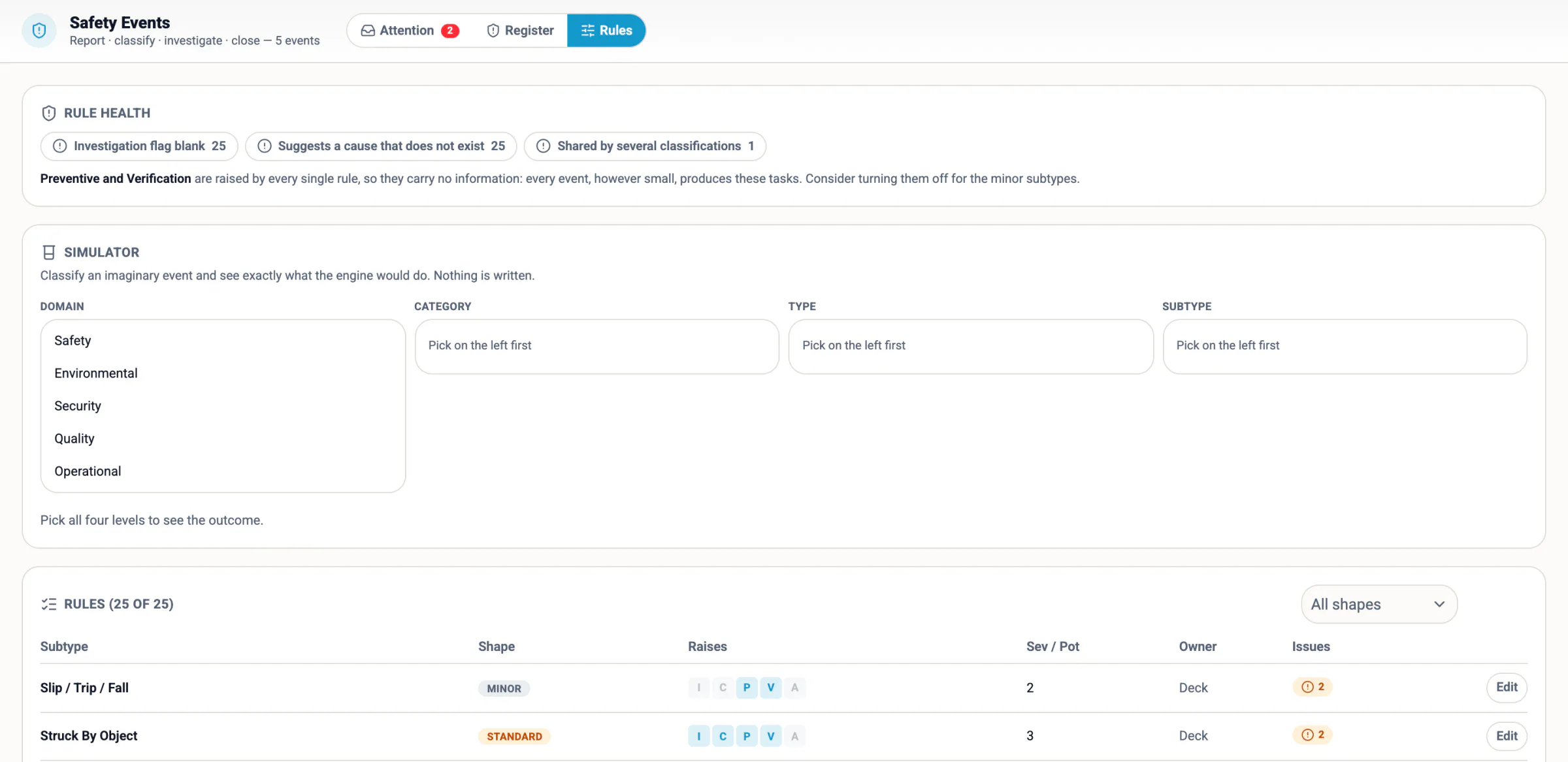
Safety Events — the rules engine: which tasks each event subtype raises, a health check on the rules, and a simulator that shows the outcome before anything is written.
// Automations

Compliance that schedules itself. Rules you edit, not release.

Every workflow below is driven by a table you can open, not by code someone has to release. Change who approves above fifty thousand, add a step to the new-joiner checklist, teach the system what a mooring incident should trigger — all of it is a row, live, this afternoon.

Whena purchase order is sent up The chain resolves itself from the rules table — fleet, department, rank and amount band — and asks the right people in the right order. Nobody has to know who signs what.
Whena safety event is classified The event rules read the sub-type and propose the investigation, corrective, preventive and verification tasks that belong to it — owner, department and due date filled in. Accept or discard each; the decision is kept. A simulator shows what a rule would do before it is saved.
Whena new applicant is created A task template unfolds into the real checklist, each step offset from the day that matters — medical before joining, contract on the day, appraisal after. Adding a step is a record, not a build.
Whena controlled form is filed The submission lands in the ledger, the compliance cell for that ship and that period fills itself, and anything the form failed opens as a finding with an owner. Nobody reconciles a tray of paper at month end.
Whenthe manual is amended The revision bumps, the diff is kept, and every seafarer is asked to acknowledge — individually, by name and timestamp. Pending means no acknowledgement exists, never a date someone calculated.
Whenanything falls due Certificates, surveys, drills, appraisals, class and crew documents land in one fleet-wide obligations register instead of eighteen modules each answering a slice of the question.
Whena document arrives A certificate, a bunker delivery note, an invoice, a vendor's offer or Excel enquiry is read into a record for a person to confirm — nothing written until they do. Questions to the file and to your own SMS manual are answered with the rows and the paragraph shown.
Whena date is entered The next audit, exam or test is proposed from the last one and the cadence; the vendor's usual account is proposed on the first invoice line; a crew-change berth proposes candidates with a match score. Metrics are recomputed on the server every few minutes.
Whena decision is taken One sender notifies in the app and pushes to the phone, and the notification opens the record it is about. Watchers follow a record by writing on it; muting is the undo. Nothing private travels in a push.
// How it fits together
THE INSPECTORTHE EVIDENCE PACK IS AN EXPORTNOT A FOLDER ON SOMEBODY'S DESK

Enter it once, and it lands everywhere it belongs.

The question every buyer asks is "how do the modules talk to each other?" — because on most fleets they do not, and the rest hours, the drills and the safety meetings are three spreadsheets that disagree. Here they are views over one file. There is no integration layer, because there is nothing to integrate.

You do this onceRest hours entered on the shipCrew Schedule…and it also becomes the MLC / STCW verdict per person, live; the seafarer's own record; the rest-hours form's receipt in the SMS ledger; a breach on the ship's attention list and the office's obligations register.
You do this onceA drill loggedDrills…and it also becomes the drill matrix per seafarer coloured by interval; the SMS drill form's receipt; attendance signed by PIN; the Master's review; the next due date on the ship's Today list.
You do this onceA safety committee meeting heldMonthly Safety Meeting…and it also becomes the minutes as the SMS form's receipt; the actions as tasks with owners; the rolling twelve-month compliance; the management-review agenda.
You do this onceA noon report filedVessel Reports…and it also becomes fleet position and ETA; voyage performance and hull fouling; emissions, CII outlook, ETS and FuelEU; the fleet KPIs — and “noon report missing” on the ship's attention list when it is not.
You do this onceA certificate read from a scanCertificate Monitors…and it also becomes the expiry monitor per ship and per seafarer; the fleet status card; the obligations register; manning gaps and the oil majors' crew compliance matrix.
You do this onceA seafarer signed onCrew Manning…and it also becomes the pool and the time machine; certificates and the matrix per charterer; the rest-hours roster and the drill matrix; the wage run and the MGA; the PIN roster on the ship.
You do this onceA requisition raised on the shipProcurement…and it also becomes routed by rule; the case, RFQ and the vendor's portal or Excel enquiry read back as offer lines; the PO through the approval matrix; delivery, three-way match, the general ledger and the budget.
You do this onceA fixture takenChartering…and it also becomes the estimate becomes the fixture and the voyage inherits it; SOF and laytime; off-hire; freight and demurrage invoiced into the same ledger; performance against the warranty.
// Why us

What the others still don't do.

Not a feature race. These are the differences your crews and your office feel on a Tuesday.

The usual fleet suiteSlashPrime
Look & feel One grey interface for every customer, unchanged for a decade. //A dashboard per department and per person; light or dark, seven accents, four type sizes — the person's own setting.
Finding Nested menus, a find mode, and a list to scroll. //One palette finds any record, module or person — and opens the record itself, instantly, without a window.
Talking Email threads about a defect, living outside the defect. //Chat on the record. DMs, groups and ship threads — with approvals you action inside the conversation.
Telling A digest, if you happen to be at your desk. //In-app and pushed to the phone, deep-linked to the record it is about.
Workflow Hard-coded. A change to the approval matrix is a project. //Approval chains, event rules and checklists are table rows. Edited by you, live.
The SMS A folder of manuals, a tray of forms, and a spreadsheet that tracks them. //Manual, forms, risk assessments, evidence and compliance in one loop — and a map to the modules that answer them.
Searching One field at a time, and export to Excel to do the rest. //Nested any/all rules like a smart playlist — and an export that lets you pick and order the columns.
Every record Notes in one module, files in another, history nowhere. //One dock on everything: notes, files, tasks, checks, chat, related records and history.
Learning it A PDF portal, a training day, and a call to support. //A guide on every screen, scoped to the tab you are on, with a how-to and a FAQ. Offline, on board, always current.
The ship A form the office asks the ship to fill in, when the link is up. //The ship's own copy, offline, opening on what she owes today by rank, signed by PIN, syncing itself.
Security Shared logins, a backup someone remembers to take, a laptop with the whole fleet on it. //Named accounts, TLS and AES-256, scheduled backups, an audit log on every commit, and every ship holding only her own slice.
Getting it A server project, a migration, and a year. //Your server or ours. From a legacy ERP or from Excel, loaded and validated by us. Module by module, at your pace.
// Modules

13 departments, 178 modules. The same file underneath.

Each one is a full working module, not a tab that opens a PDF. They share the register, the people, the companies and the audit trail.

// crew

Crew & HR

Assignments, certificates, rest hours, payroll

// pms

Technical / PMS

Maintenance, defects, running hours, jobs

// finance

Accounting

Budgets, cash to master, MGA, exchange rates

// procurement

Procurement

Requisitions, enquiries, POs, inventory

// ism

HSQE & ISM

Forms, audits, risk, incidents, compliance

// position

Voyage & Ops

Position, port log, bunkering, noon reports

// fleet-map

Maps & Weather

Live vessel position and weather routing

// vessels

Fleet register

Particulars, certificates, documents

// safety-events

Safety Events

Near misses, incidents, root causes, lessons

// jobs

Jobs & Works

Jobs, running hours and the work behind each ship

// shipyard

Shipyards

Yard jobs, quotations, attendance and invoicing

// projects

Projects

Scopes, milestones, cost and progress per project

// tenders

Tenders

Enquiries, offers and awards in one thread

// certificates

Certificates

Ship and crew certificates, surveys, renewals

// chartering

Chartering

Voyage estimates, fixtures, laytime and results

// slashai

AI & Analytics

Ask the file, ask the documents, read them into records, fleet KPIs

// And more

Then there is everything else.

The domains above are the headline. Underneath them the platform already carries the screens a ship manager actually opens in a week — and the ones nobody asks for in a tender and nobody gives back — every one sharing the same register, the same people, the same companies and the same audit trail.

//Operation packs //Port cost intelligence //Bunker intelligence //Pre-joining clearance //Crew Live & Time Machine //Crew compliance matrix //Price memory & vendor scorecard //Supplier portal & Excel enquiry //Three-way match //General ledger & myDATA //Provisions & victualling //Lube-oil trends //Emergency response room //TMSA & vetting prep //Underwater inspections //Workflow builder //Dashboard builder //Fleet Mirror (office ↔ ship sync) //Vessel app & mobile launcher //Circulars & fleet notices //Lessons learned //Management of change //Management review (ISM 12.2) //Audits & inspections //Port state control //Vetting & SIRE //Attendances & superintendent visits //Drills & training //Safety meetings //Checklists, on any record //Root causes //Rest hours (MLC) //Watchkeeping //Crew appraisals //Crew claims & P&I //Crew certificates by ship //Manning & crew changes //Payroll & wage scales //Cash to master & MGA //Leave & presence //Personnel & departments //Garbage disposal //Emissions, CII & MRV //Dry dock & shipyard //Defects //Jobs & running hours //Underwater & hull //Stevedore damages //Tenders //Chartering & voyage estimates //Sale & purchase //Tug charter //Daily movements //Fleet map & weather //Noon & vessel reports //Bunkering & bunker ops //Procurement & requisitions //Payments & obligations //myDATA (ΑΑΔΕ) //Legal & insurance //Projects //Companies & contacts //Cyber security //Audit log //Command centre //Bugs & ideas

178 modules in one build, and the list is still growing. The full module index, with a line on each →

// One day
THE AGENCYJOINING 02/10 · CLEAREDTHE PRINCIPAL'S SHIP

One day, as the file records it.

Nothing below is a screen someone opened on purpose. It is what happens when the work itself is the data entry.

06:20 AEGEAN STAR Second engineer closes a running-hours job on the aux boiler. The next service falls due automatically, 250 hours out, and appears on the superintendent's board before he is at his desk.
08:05 Chief officer Raises a requisition for two mooring lines against the ship's own catalogue. It routes to the technical manager by department, not by guesswork — and he is the requester's manager, so it sends itself.
09:47 Procurement desk Procurement grabs the case, sends three RFQs, and the vendor thread — offer, revision, award — stays on the case instead of in an inbox.
11:42 ADRIATIC DAWN Noon report lands: position, distance run, ROB, consumption. 486,20 t reads 486,20 t in the bunkering module, the emissions figure and the month's report. No one converted anything.
13:15 CORAL BAY Port state control raises a deficiency. It opens as a safety event with the photographs attached, a root cause, and a corrective action with an owner and a date — closed out where the inspection lives.
15:30 Crewing A crew change for 11/09 shows one rank short of the vessel's required manning, because certificates are counted per ship. The gap is visible five weeks before she sails, not at the gangway.
17:58 Managing director Approves the mooring lines from his phone. The PO is stamped, the vendor notified, and the ship sees "Approved" against the line she raised at 08:05.
// How it fits

Built around how ships actually report.

The details that decide whether a system gets used or quietly worked around.

01 Dates the way the office writes them

DD/MM/YYYY on every screen, every export, every printed form. No locale guessing, no ISO leaking into a report someone signs.

14/09/2026   09/14/2026

02 Numbers the way the ledger reads them

Greek and EU formatting throughout, so a total never reads one way in the app and another on the layout beside it. Blank stays blank — an empty field is not a zero.

1.234.567,89   1,234,567.89

03 An audit trail nobody has to keep

Status moves, approvals, revisions and who changed what are written as the work happens. A question about a cost has an answer, not a search.

04 Notifications that reach the ship

One sender, in-app and to the phone. Tapping one opens the record it is about — the case, the requisition, the vessel — not a list to hunt through.

05 Help written into the screen

A guide on every screen, scoped to the tab you are looking at, with a how-to and a FAQ. No portal, no PDF, no login, and no version that describes last year's buttons.

06 Your server or ours

Claris FileMaker Server on your hardware, in your cloud tenancy, or hosted and monitored by us — Mac and Windows clients, any browser, iPhone and iPad, and a paired copy on every ship.

// Security
AES-256 AT REST · A NAMED ACCOUNT FOR EVERYONETLS IN TRANSITHER OWN SLICE

Secure by design, on Apple's Claris platform.

SlashPrime runs on Claris FileMaker, the database platform developed by Claris, an Apple subsidiary, in production worldwide for over three decades. What we built on it is a system in which every person is named, every connection is encrypted, every change is logged, and every ship carries only what is hers.

01 Encrypted in transit and at rest

Every connection — office client, browser, iPad, vessel agent — over SSL/TLS with your own certificate. The database file encrypted with AES-256, so a copied file is an unreadable file. Backups inherit the encryption.

02 Backed up on a schedule

Full and progressive backups on the server, verified, retained by policy and copied off-site. Restoring a file is a rehearsed procedure, not an emergency.

03 A named account for everyone

No shared logins ashore. Sign in with your Microsoft or Google identity so your own password and multi-factor policy apply; privilege sets decide what an account may open, read and change.

04 Every commit logged

Who changed what, and when, on the tables you choose to audit — per record and per person. Deletions are counted, not hidden. The trail an ISM auditor asks for is a screen.

05 Off-site backups that cannot be altered

Every backup is copied automatically to off-site object storage in the EU with object lock — write once, read many. For its retention period it cannot be changed or deleted by anyone, an administrator or a ransomware included. Restoring from it is a rehearsed procedure, not an emergency.

06 Files and AI behind the server

Documents in object storage are reached through short-lived signed links minted by the server; the model key never leaves it; the reader writes nothing until a person confirms. Every list exports to Excel — the data is yours.

Security is a property of the whole, not a feature. Ask us for the technical annex; it is written for your IT.

// Switching
YOUR EXCEL · YOUR OLD ERPLOADED, VALIDATED, WORKINGNOTHING RETYPED

Legacy ERP or Excel? Nothing gets retyped.

The reason fleets stay on a system they dislike is the move, not the software: years of certificates, running hours, crew histories and supplier lists somebody would have to type again. They do not. Whatever you run today — an older maritime ERP, spreadsheets, Word forms, or all three — we take the exports, load them, check them, and you are working in weeks, not seasons.

// From your legacy ERP

An export is enough

Vessels and particulars, certificates and surveys, machinery and PMS history with running hours, defects, crew and sea service, suppliers, the catalogue, purchase history. We map it once and load it.

// From Excel, Word and scans

Loaded as they are

The crew list, the certificate sheet, the budget, the supplier list; your Word and Excel SMS forms made interactive through the form builder; certificates and invoices read from the scan.

// Validated on the way in

Blank is never turned into zero

Duplicates, blanks that would break routing, dates that cannot be, a ship with no Master — checked before it counts. Data health scores what remains, with the module that fixes each. One department first, in parallel, a thirty-day decision, a fixed price.

// Next

See it running on your own fleet.

A page can show you screens. It cannot show you your ships on them. The demo can — forty-five minutes with your vessels' names, your ranks and your SMS forms index loaded, online or at your office. Then a pilot on one department, a fixed-scope onboarding, and a decision after thirty days of real use.

sales@slashback.grRequest a demo → +30 211 40 87 365Call → info@slashback.grGeneral → The Enterprise leafletGet the PDF → Claris Partner

SlashBack · 4 Paschalias Street · 15452 Palaio Psychico · Athens, Greece · Claris Partner · runs on Mac, Windows, iPhone, iPad and the web · support after go-live: support@slashback.gr